
The short answer: six steps for a first session
A first session needs only the counter, its USB-C cable and a place you can come back to. The order matters more than any setting: prepare the device, learn what your surroundings read, then measure objects against that baseline. A number on its own says very little; it means something only next to what the same counter shows, in the same place, with nothing in front of it. The six steps below are the whole method, and the sections that follow explain each one.
Two limits apply from the start. The glass Geiger-Muller tube sees beta, gamma and X-rays; alpha particles are out of its reach. The counter is not a radon test, not a food or water test, not a detector of EMF, Wi-Fi or 5G, and not protective equipment. Every number is indicative. For what CPM and µSv/h mean, our guide to Geiger counter units explains how to read the screen.
- Charge the built-in battery over USB-C and switch the counter on.
- Set the language, backlight, main display and the two alarms.
- Leave it in one place for a few minutes and note the average background.
- Hold an object close, at a fixed distance, and wait for the reading to settle.
- Compare the average with your background, in CPM as well as µSv/h.
- Move the object away and let the reading fall back before the next one.
Before the first reading: charge it and set it up
The counter runs on a built-in 1,800 mAh lithium-ion battery charged over USB-C; it is not user-replaceable. The box holds the counter, a USB-C cable, the user manual, the manufacturer's inspection slip and a warranty card, but no wall charger, so use a 5 V USB charger you already own. Do not heat or pierce the battery, or leave it charging unattended. Battery life depends on the mode: the manufacturer states 30 days or more in long-life mode, one independent test found about 5 days in normal use.
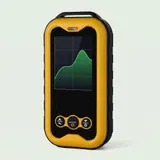
Then open the menu. Choose the language, the backlight duration and brightness, and the main display: numbers for spot checks, or the dose-rate trend graph to watch a reading rise and fall. Set the two alarms, one on dose rate and one on dose, each with its own threshold, and choose how they warn you: sound, flashing light or vibration. Last, turn the particle sound, a click per count, on or off.
| Step | What to do | Why |
|---|---|---|
| Charge | Plug in the USB-C cable and charge the built-in battery | 30 days or more in long-life mode (manufacturer), about 5 days in normal use (independent test) |
| Set up | Choose language, backlight, main display, the two alarms and the particle sound | The alarms warn by sound, flashing light or vibration at thresholds you choose |
| Baseline | Leave the counter in one spot for a few minutes and note the average | Background changes from place to place and with altitude (EPA) |
| Measure | Hold the object close at a fixed distance and wait for the reading to settle | Radiation falls off quickly with distance (EPA) |
| Compare | Read the average in CPM and µSv/h against your baseline | The µSv/h estimate runs high on beta; CPM is the raw count |
| Reset | Move the object away and wait for background | The reading takes time to fall back after a more active object |
Take a background baseline first
Background is what the counter reads with nothing special near it. According to the EPA, it comes mostly from minerals in the ground, water and cosmic radiation; it varies from place to place and rises with altitude, so Denver receives more cosmic radiation than places at sea level. A figure from someone else's house tells you little about yours. Put the counter on a table where you will measure objects, leave it for a few minutes, then note the average dose rate and CPM, with the date.
As a rough reference, one independent test measured about 20 CPM at background on a J321-size glass tube, the type the supplier lists for this counter. Your figure can differ, and CPM belong to the tube: never compare CPM between two different counters. For context, the EPA puts the average annual dose per person in the United States at 6.2 mSv (620 mrem), citing the NCRP: a scale, not a line between good and bad readings.
How to measure an object
The EPA notes that radiation falls off quickly with distance, so distance has to stay fixed. Hold the counter close to the object, or rest the object beside it, and keep that same gap every time you compare. The number takes time to settle on a source, so watch the trend graph until the line levels out, then read the average rather than the real-time figure and compare it with your baseline from the same place. A single jump on the screen is not a result.
Read CPM as well as µSv/h. The tube has no beta shield, so on objects that give off mostly beta the µSv/h estimate runs high; one independent test advises reading the raw count instead. After a more active object, wait for the reading to fall back to background before the next piece. With old objects, the precautions below apply every time.
- Keep uranium glass, old Fiestaware and radium dials intact; never take apart a radium dial.
- No food or drink in them; wash your hands after handling.
- Broken piece: ask your local authority how to dispose of it.
- Unusually high or persistent reading: move away, do not handle the object, contact your state radiation control program or the EPA; in an emergency, call 911.
How to tell your Geiger counter is working
The first sign is simple: at background, it counts. With the particle sound on you hear irregular clicks, and the CPM figure and trend graph move around a steady average instead of sitting at zero. The count is uneven from one second to the next, which is why you judge the average over a few minutes. If the screen stays at zero for several minutes in an ordinary room, check the charge and settings, then email customer service with what the screen shows.
A second check uses something you may already own. The EPA notes that uranium glass, some Fiestaware made before 1973 and self-luminous radium dials can make a Geiger counter react when held close; the count should rise above your baseline, then fall back as you move away. No radioactive check source is included or sent separately. Test cards sold online are outside the verified facts here, so none is recommended, and there is no need to buy a radioactive object.
Geiger counter calibration, explained
Consumer Geiger counters are set by the manufacturer at the factory. For this counter, the manufacturer states a relative error under 10 % at 1 mSv/h against its own reference, and each unit ships with its inspection slip. Neither is a calibration certificate: a certificate comes from a calibration lab, which checks a specific unit and issues a document for it. So this is not a calibrated instrument, and its readings stay indicative. The manufacturer quotes a range of 0.01 µSv/h to 50 mSv/h and an energy response of 48 keV to 1.5 MeV.
In practice, use the counter to compare, not to prove: an object against your baseline, a room over several days, a change in the trend. The µSv/h figure is an estimate that runs high on beta. A documented measurement, for work or a property, calls for a calibrated instrument and a trained user, as the EPA notes about measuring granite countertops precisely.
Logging: cumulative dose and timed dose
Beyond the live reading, the counter keeps a running total. Cumulative dose mode adds up µSv over time, and you can check the date the count started. Timed dose runs for a duration you set from 0 to 999 hours, handy to compare the same room on different days. The cumulative dose, trend curves, alarm history and thresholds are kept after a power cut, dated by a calendar clock. Treat the total as an indicative log, not a regulatory dosimeter reading.
There is no Bluetooth and no phone app. The manufacturer describes a PC data download over USB-C with its own software, not supplied with the counter, so plan on reading logs on the screen. Geiger Counter Shop sells this one pocket Geiger counter: glass GM tube (J321 type as listed by the supplier), 2.4-inch color screen, µSv/h and CPM, trend graph, alarms and a USB-C battery, shipped free from stock in the US or the UK.
Frequently asked questions
How do I know if my Geiger counter is working?
Switch it on in an ordinary room and wait a few minutes. A working counter keeps counting: CPM and the trend graph move around a steady average, and the particle sound clicks. If you already own uranium glass, the count should climb when you hold the counter close and drop back as you move away. A reading stuck at zero calls for a charge check, then an email to customer service.
Does a Geiger counter need calibration?
It depends on what the numbers are for. A consumer counter is set at the factory, which supports comparing readings on the same unit. That factory setting is not a calibration certificate, which only a calibration lab issues. For documented figures at work, in a property or in a report, you need a calibrated instrument and a trained user.
What does 999 MAX mean on the screen?
It means the dose rate is above the counter's range, so the screen can no longer show a figure. The manufacturer gives that range as 0.01 µSv/h to 50 mSv/h. Treat it as an unusually high reading: move away from the source, do not handle the object and contact your state radiation control program or the EPA. In an emergency, call 911.
Sources
- U.S. EPA, Radiation Sources and Doses
- U.S. EPA, Radioactivity in Antiques
- U.S. EPA, Radiation Terms and Units
- HyperPhysics (Georgia State University), Geiger Counter
Our guides are based on the supplier's listings and public documentation. We have not tested the counter ourselves.


